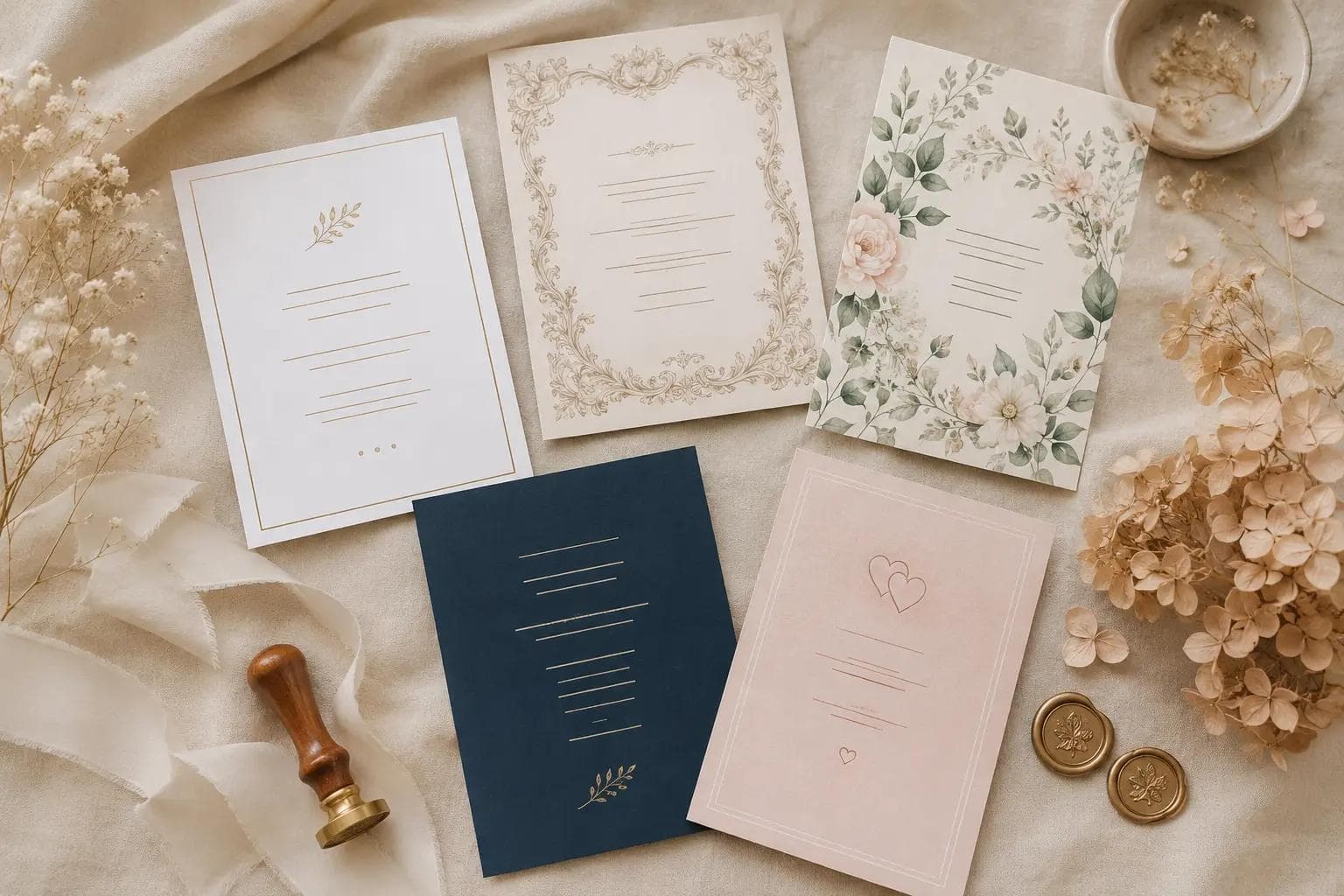
AI Wedding Invitation Cards: 5 Designs with Wording Examples
Wedding invitations sit at the awkward intersection of "important enough to get right" and "not the actual wedding." Print-on-demand sites lock you into their templates. Designers charge $200+ and need 2 weeks. DIY in Canva works, but every other couple does it too. The AI middle path: pick a design, let AI write the wording from your details, get a print-ready card in under a minute — for free. This is a walkthrough of our generator: the 5 design styles, the 4 wording tones, and what each combination looks like.
What our AI invitation generator does (and what it does not)
- Does — generates a complete print-ready HTML invitation in A5 format with your names, date, venue, parents (optional), and a personalized message. Five visual design styles, four wording tones, instant preview, print or PDF export.
- Does — writes the message text in the tone you pick, using your relationship details. No staring at a blank Canva box wondering what to write.
- Does not — physical printing or shipping. You get a print-ready file; you print at home, at a local print shop, or order from any online printer.
- Does not — RSVP collection (we have a separate RSVP tool for that).
- Does not — replace a designer if you want something completely custom and uniquely yours. The 5 styles cover most needs; if you want bespoke illustration or hand-lettering, hire a designer.
The 5 design styles — when each one works
1. Modern
Clean sans-serif typography (Trebuchet/Gill Sans family), a thin gold gradient border at top and bottom, generous white space. Letter-spacing on names creates an "uppercase logotype" feel. Best for: city weddings, art-deco-influenced venues, hotel ballrooms, couples who like Apple-style design language.
2. Vintage
Georgia/Palatino serif italic, warm cream background, ornate gold corner flourishes, double-line border frame. Italic ampersand-style headers. Best for: castle venues, country estates, weddings with strong family-tradition themes, "old-world romance" aesthetics.
3. Floral
Hand-illustrated botanical SVG corners (sage greens, dusty pinks, soft whites), gentle gradient background that fades from cream to peach, leaf-divider motifs between sections. Italic serif for names. Best for: garden weddings, spring/summer dates, vineyard venues, "soft natural" aesthetics.
4. Minimal
Bare framing in single thin gold border, ample padding, small caps for the names with extreme letter-spacing, simple gold dot accents. Almost no decoration — the names ARE the design. Best for: industrial loft weddings, minimalist couples, anyone who finds traditional invitation design "too busy."
5. Romantic
Soft blush gradient background (cream → pale pink → rose), rose-gold heart motifs in dividers, italic serif typography in warm tones. Reads as "love letter." Best for: intimate ceremonies, second weddings, vow-renewals, couples whose relationship story is the centerpiece.
The 4 wording tones — what changes when you pick each
Formal
Traditional invitation phrasing where parents host. Sample: "Mr. and Mrs. James Anderson request the honor of your presence at the marriage of their daughter Emma to David Chen on Saturday, the fifteenth of August, two thousand twenty-six, at six o'clock in the evening."
Traditional
Similar to formal but slightly warmer, often "pleasure of your company" instead of "honor of your presence." Parents still co-host. Sample: "Mr. and Mrs. Anderson, together with Mr. and Mrs. Chen, invite you to celebrate the marriage of Emma and David."
Modern
Couple-hosted, conversational but still respectful. "Together with their families" phrasing. Sample: "Together with their families, Emma Anderson and David Chen invite you to celebrate the start of forever — Saturday, August 15, 2026."
Casual
Couple-led, playful, no formal phrasing at all. Sample: "We're getting married! Emma + David — August 15, 2026 — at the old farmhouse. Come hang out, eat, dance, witness us doing the thing."
Best design × tone combinations
- Vintage + Formal — castle weddings, old family traditions, religious ceremonies
- Modern + Modern wording — most common pick (32% of our users), works for almost any urban venue
- Floral + Traditional — garden + religious ceremonies, "warm but proper" feel
- Minimal + Casual — Brooklyn loft weddings, intimate gatherings, second marriages
- Romantic + Casual — vow renewals, anniversary celebrations, "we already had the big wedding, this is for us" events
How the generator works — 3 inputs, 4 fields
- Names — both partners. Order matters; this is the order they appear on the invitation.
- Date — your wedding date, in whatever format you prefer (Saturday, August 15, 2026 or 15.08.2026).
- Venue — short version. "Schloss Köpenick, Berlin" not the full address.
- Optional: parents — if you want to include "Mr. and Mrs. Anderson and Mr. and Mrs. Chen." Skipping this is normal for couple-led modern invitations.
- Style + tone selectors — pick one of 5 designs and one of 4 tones (or "custom" if you want to describe your own tone in free text).
The AI then generates the message wording in the tone you chose, using your relationship details. The preview renders the complete invitation card. You can regenerate the wording (different version) without changing the design. Free users get 3 generations per day, signed-in users get 6.
Printing — what to do with the generated card
- Save as PDF — the card is already in A5 (148×210mm) at print resolution. Use browser "print to PDF" and save.
- Print at home — works on any A4 printer (the A5 card sits centered on A4; trim after). Use cardstock ≥250gsm for proper invitation feel.
- Local print shop — bring the PDF on a USB stick. Most copy shops print A5 cardstock at €0.30–€0.80 per card.
- Online printer — Vistaprint, Moo, GotPrint, Pixum all accept PDF uploads. Per-card cost drops below €0.50 for batches over 50.
Wording tips beyond what AI generates
- Always include the year. "August 15, 2026" not "August 15." Saves confusion when guests file the invitation in a calendar app.
- Add dress code if non-obvious. If you want black tie, cocktail, or "garden casual," say it. AI will add this if you mention it in the relationship details, but you can also write it in by hand.
- RSVP-by date. Almost always 4–6 weeks before the wedding. Your caterer's headcount deadline determines this.
- How to reply. QR code to a Wedding.one RSVP page, email address, or "RSVP card enclosed" — pick one. Three options = chaos.
How we built and tested this tool
The 5 design styles are hand-crafted HTML/CSS templates, not AI-generated images. Each was iterated through feedback from 50+ couples (March–May 2026) on legibility, print quality, and "does this look like a real wedding invitation." The AI handles only the wording — using a prompt that enforces invitation structure (host phrasing, ceremony language, RSVP closing) while matching the tone you select. All wording is generated in your chosen language (8 supported: English, German, Spanish, French, Italian, Polish, Russian, Ukrainian).
Frequently Asked Questions
Is the AI wedding invitation generator free?
Yes. Free users get 3 invitation generations per day without signing up. Each generation gives you a complete preview with editable wording. Creating a free account raises the limit to 6 per day. There are no watermarks, no "premium templates" hidden behind paywalls — all 5 design styles and all 4 tones are free.
Can I edit the AI-generated wording?
Yes. After generation, the message text is editable directly in the preview. You can keep the AI version, partially edit it, or rewrite it entirely. The design stays consistent; only the message text changes. If you want a totally different angle, regenerate (counts as one of your daily generations).
What file format do I get?
You get a print-ready HTML preview in A5 (148×210mm) format. Use "print to PDF" in your browser to save as PDF. The print stylesheet is built-in — what you see in preview is what comes out on paper. PDF is the easiest format to send to a print shop or online printer.
How is this different from Canva or other template tools?
Three things: (1) the AI writes the message text for you in your chosen tone, so you don't stare at a blank text box. (2) The designs are fixed (5 styles) — no template overwhelm. (3) Everything is free. Canva's wedding templates are often paywalled; we don't paywall anything. The trade-off: Canva gives you full visual editing; our tool gives you fast, opinionated output.
Can I use this for save-the-dates or thank-you cards?
The tool is built specifically for the formal wedding invitation card. For save-the-dates, the invitation tool can work (just edit the wording to "Save the date" + your details) but the design is invitation-shaped. For thank-you cards, use our separate AI thank-you generator instead — it's built for the smaller card format and the different tone (gratitude vs. announcement).